



- Overview of the lab hardware
- Front-side rack sections
- Back-side rack sections
- Obligatory warning
- Next step: Detailed configuration
Overview of the lab hardware
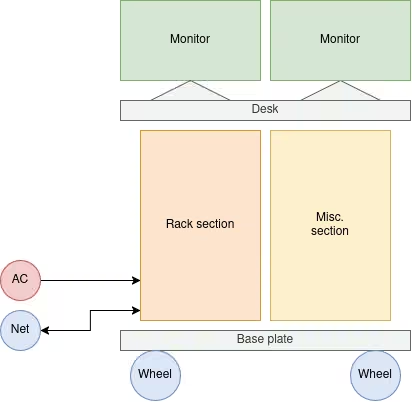
On a very abstract level the laboratory is a computer rack system on wheels. We have built a custom rack enclosure with two sections: one with a 19" rack and a second section which can be customized for different use cases.
The system can connect to wired and wireless networks. Our system is utilizing 802.11ac Wi-Fi, gigabit Ethernet, and 4G cellular networks, but more efficient equipment can be used if needed. The network connections available in a typical office are the ultimate limiting factor.
The whole rack is powered by a rack PDU (power distribution unit). We mainly use low power devices so the total consumption of the rack is less than 920W (230V / 4A), but the PDU can handle up to 230V / 15A. In a typical office, the building's electrical supply is a limiting factor, as the wiring and outlets in the rooms are unlikely to handle loads exceeding 10A.
Front-side rack sections
KVM
The KVM switch can be seen as a multiplexer that allows focusing on a single SUT (system under test) at a time. The HDMI output of each device is routed to the monitor. USB devices such as keyboards and mice are also routed in a similar way.
Routers
The routers are basically general purpose computers with an integrated Ethernet bridge and Wi-Fi modules. They can be configured to operate as Wi-Fi clients, APs (access points), or bridges. They can also operate as Ethernet switches or routers. The limited resources also allow running small footprint services such as MQTT. One router is typically used to isolate the lab network from the company / public network.
Meters
The power meters section includes SmartPower meters that can be used to power and measure the consumption of all the DC powered switches, routers, single board computers, tablets, and phones. Classic USB (not quick charge) can also be measured with adapters.
Switches
The switches serve two purposes. The routers are typically limited to 4-5 ports. Switches can be used to extend the local lab network with more devices. In addition, switches can be connected in series to measure the consumption of data transmission across multiple devices.
Cable management
The cable management module (the hole with a brush) allows routing network and power cables from the front panel to the units at the back
Small form-factor PCs
The small form-factor x86-64 PCs are tiny computers that represent low-power systems used in offices and schools. The PCs can be measured with a high-power DC meter or AC power meters.
Storage box
The rack contains a lockable storage box for various accessories, cables, adapters, and tools such as screwdrivers, pliers, multi-meters etc.
Server PC
A standard ATX system which can house external GPUs, hard drives, and other accessories. Compatible with the ATX power meter (PMD2). Currently, a desktop PC is used to emulate a server, but is missing the following features: UPS, IPMI, replicated power, multiple sockets, ECC RAM, high bandwidth I/O lanes.
Back-side rack sections
The switches allow extending subnets defined by the routers. The Wi-Fi routers are typically limited to 4-5 ports per device. The switches can be used to manage a larger pool (8 to 24 ports) of network connected devices.
Odroid nodes
The Odroid single-board computers represent low-power x86-64 systems. Their power-drain behavior that is close to the one of low-power laptops. The nodes automatically boot when powered on, and can be controlled via HDMI and USB. In our setup, the typical use does not require any physical access.
Raspberry Pi nodes
The Raspberry Pi hardware is somewhat similar to some Android based mobile devices. The nodes are also commonly used in various DIY projects. The nodes automatically boot when powered on, and can be controlled via HDMI and USB. Small TFT screens can be connected and powered via the Raspberry Pi board.
Power distribution unit
The power distribution unit is located in the center of the rack to optimize cable lengths. The PDU has one input slot and multiple output slots for different systems. Even the monitors are connected to the PDU.
USB hub
If a single-board computer or a small form-factor (SFF) computer is used to run the PowerGoblin service instance, the system is usually limited by the number of available USB ports (not bandwidth). The rack contains more than six (6) USB connected meters, but the small computers usually contain at most 5 ports. One of the ports is reserved for the KVM. The ports at the front of the device are usually useful for plugging other, unspecified portable devices.
A powered USB hub allows connecting more meters to the system, but routing the messages through the hub also affects the latency of the meter readings.
Power supplies
The 19V power supplies are supply power to the Smart Power meters available via the front side of the rack. These supplies are quite heavy so in our system they're located near the x86-64 server system at the bottom.
Obligatory warning
The lab setup IS NOT A TOY, it is a precision instrument for professionals Before doing any measurement, at least make sure all the wires are connected (loose wires might cause short circuits) and all devices are properly secured so that they cannot move accidentally. Also make sure the power meters are configured to feed the correct voltage levels. Over-voltage most likely will also destroy the devices. Short circuits and over-voltage can also start a fire.
Next step: Detailed configuration
The next hardware section covers the Detailed configuration of the hardware.